What you see on your desktop
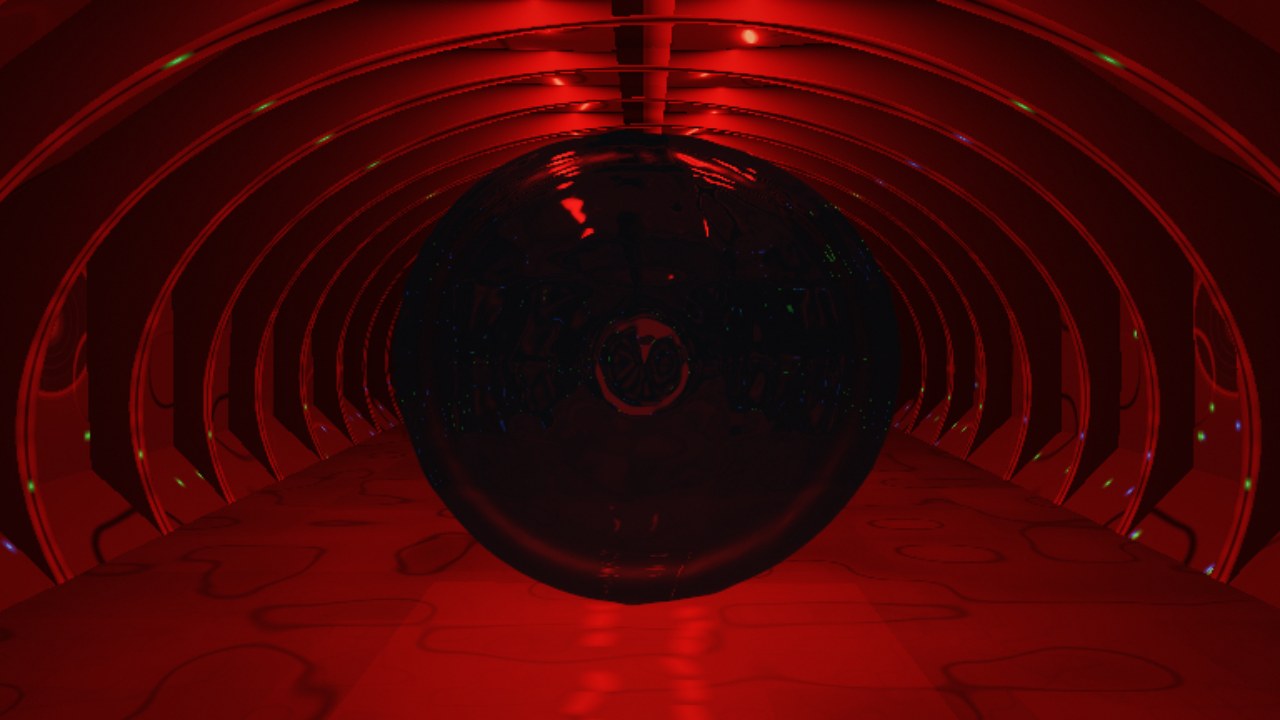
Liquid Orb turns your Windows desktop into the hall of an alien ship: biomechanical ribs arch overhead, a row of staggered red ceiling lights runs into the distance, and tiny green and blue status lights glow in the walls. In the middle, a ball of black liquid hangs at eye level. It gives off no light of its own; you see its waves as moving glints of red.
What it does
- Reacts to any sound on your PC. Lively hands the wallpaper your system audio, so the Spotify app, YouTube and games all count. The sound is split into seven ranges: bass rings travel across the liquid and focus into a mound, kicks push the orb toward you, and mids and treble add finer ripples.
- Reacts to your mouse. The cursor presses a dimple into the liquid and drags ripples behind it.
- Never repeats. It is rendered live on your graphics card, not a video loop.
- Sharp up to native 4K. With the Full 4K setting it draws at your screen's own resolution.
- Tiny download. About 1 MB for the whole zip; the wallpaper itself is about 0.1 MB of code. A 4K video wallpaper is often 100 MB or more.
How to install
- Install Lively Wallpaper, free, from the Microsoft Store or the official Lively website.
- Download the zip above.
- Drag the zip into the Lively window.
- Click Liquid Orb in your Lively library to set it.
- Optional: right-click it → Customise to change sharpness, frame rate and music reaction.
Settings
- Sharpness: Balanced, High or Full 4K.
- Frame rate: 24 to 60 frames per second (30 to start).
- Music reaction: from 0 (off) up to 2 (strongest).
- Beat sensitivity: how readily kicks and beats push the orb toward you.
- React to the mouse: on or off.
Good to know
- Windows only. Lively runs on Windows 10 and 11. On a Mac or a Chromebook, get Liquid Orb in your browser instead.
- It uses your graphics card like a small game. On a laptop, choose Balanced sharpness.
- It steps aside for full-screen games. By default, Lively pauses the wallpaper while a full-screen game or app is running.
- Give it a few seconds with music. The first time you play music, it may take a few seconds to calibrate to your volume.
Want it in your browser too?

Liquid Orb is also a theme in Ambient New Tab, live wallpaper for Chrome: a living scene on every new tab. It works on Mac, Windows, Chromebook and Linux.
See Liquid Orb in the Chrome extension →Questions
Is Liquid Orb free?
Yes. The Liquid Orb live wallpaper for Lively is free to download and use, with no account. Lively Wallpaper itself is a free, open-source Windows app.
Does it work in 4K?
Yes. Choose Full 4K under Sharpness. Liquid Orb is rendered live at your screen's own resolution, so on a 4K monitor it is drawn at 4K instead of being a stretched video.
Does it work on Mac?
Not as a desktop wallpaper: Lively runs only on Windows. On a Mac or a Chromebook you can have Liquid Orb in your browser instead, with Ambient New Tab, live wallpaper for Chrome.
Will it slow down my games?
By default, Lively pauses the wallpaper while a full-screen game or app is running, so it is not drawing while you play. On the desktop it uses your graphics card like a small game; on a laptop, choose Balanced sharpness.
Does it need my microphone?
No. Lively hands the wallpaper the sound your PC is already playing, and Liquid Orb only measures how loud each sound range is. Nothing is recorded or sent anywhere.